Paper intake forms have been the default for so long that most practices don't think about the cost anymore. The clipboard goes out, the patient fills it in, someone at the front desk deciphers it, and care begins, maybe with the right information, maybe without. It's a workflow held together by habit and the goodwill of your staff.
Digital intake gets talked about a lot, but usually in the abstract: "paperless," "efficient," "modern." That framing doesn't actually help you decide anything. What helps is a concrete comparison, what paper intake actually costs your practice in time, accuracy, and clinical readiness, versus what a well-built digital adaptive intake workflow looks like in practice.
This is that comparison.
What Paper Intake Actually Costs Chiropractic and PT Practices
The clipboard handoff looks simple. It rarely is.
Front-Desk Transcription Time
A patient fills out a paper form. Someone on your team reads it, then re-enters the relevant information into your practice management system or EHR. If your volume is 20 new patients a week, and that transcription step takes five to ten minutes per patient, you're spending two to three hours a week on data entry that adds zero clinical value. Scale that across a year and it's a meaningful slice of staff time, time that could go toward scheduling, billing follow-up, or actually talking to patients.
This is one of the clearest arguments for electronic intake forms in allied health: the transcription step doesn't get faster with experience. It just keeps happening.
Illegible Handwriting and Incomplete Fields
Paper forms depend entirely on the patient's willingness to write legibly and completely, in a waiting room, often in a hurry. Missing DOB. Skipped medication section. A symptom description that reads "back hurts on and off." These gaps aren't edge cases — they're routine. And by the time a provider notices an incomplete field, the patient is already in the room.
There's no mechanism on a paper form to enforce completeness. A digital patient intake form can be. More on that below.
Forms That Don't Adapt
A standard paper intake form is a fixed document. A patient coming in with cervical radiculopathy and a patient coming in with a plantar fascia complaint both get the same form, one that may cover neither complaint well. The questions don't branch. If a patient marks "yes" to numbness and tingling, the form doesn't ask where, when, or with what movements. That clinical context gets gathered in the room, which is fine — but it means the provider starts the visit from scratch instead of starting where the patient's story already left off.
Paper forms also have no concept of urgency. A patient who marks severe chest pain and left arm numbness on a pain intake form gets the same waiting room experience as everyone else. Nothing surfaces that until someone reads it.
The Transcription-Error Problem
Hand-entered data introduces errors. Misread sevens and ones. "Daily" entered as "occasionally." A pain level of 8 transcribed as 3. These aren't hypotheticals — anyone who's worked a front desk has a version of this story. Once bad data is in the system, it tends to stay there.
What Digital Adaptive Intake Looks Like in Practice
Not all digital intake is the same. A PDF someone fills out on a tablet and emails back is digital in format but paper in function, no branching, no flags, no structured output. The meaningful upgrade is adaptive digital intake: forms that behave like a clinical conversation rather than a questionnaire.
Branching Logic That Follows the Patient's Story
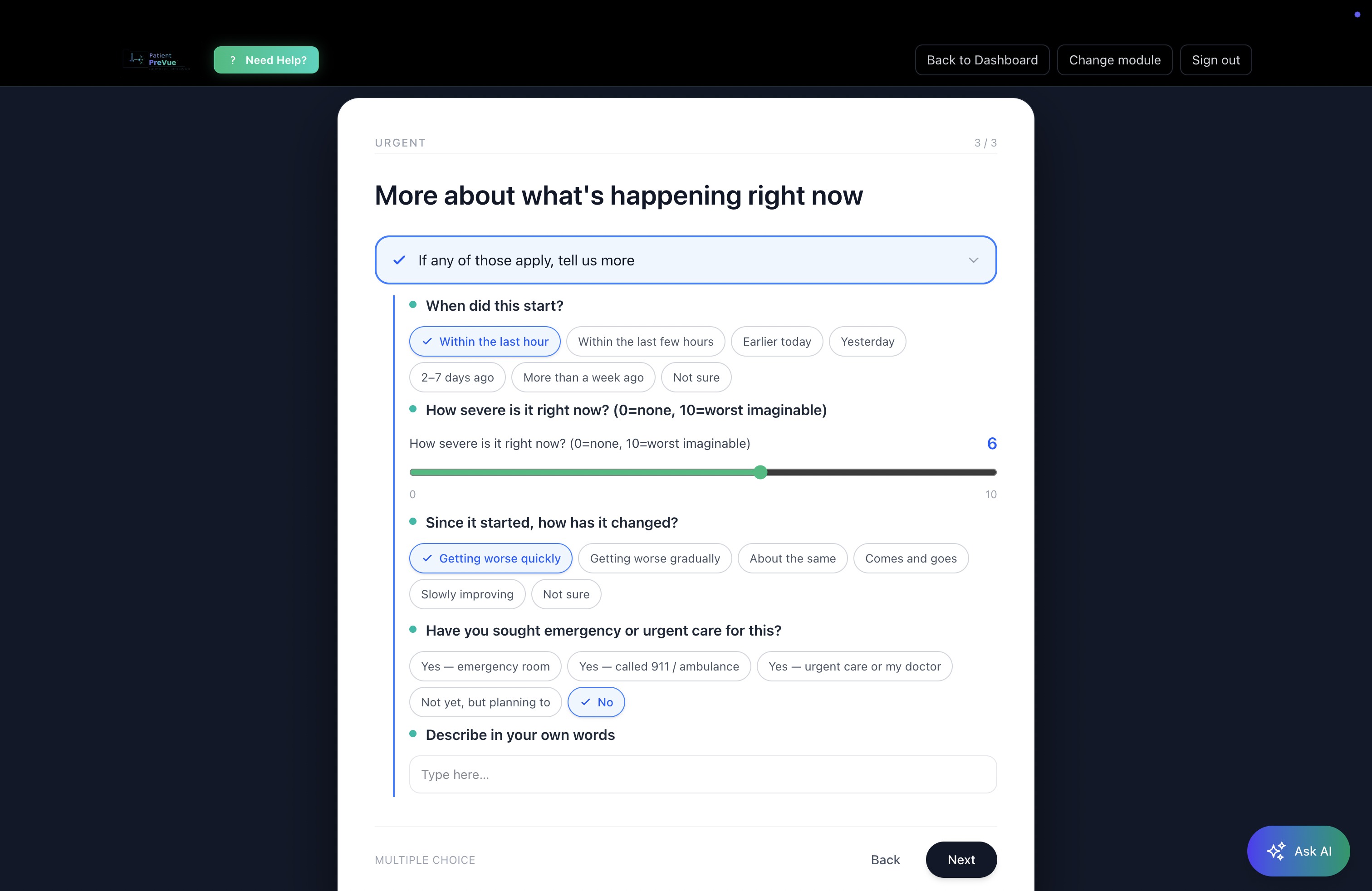
With adaptive intake assessments for physical therapy and chiropractic, questions change based on prior answers. A patient who marks "yes" to radiating leg pain gets follow-up questions about distribution, aggravating movements, and neurological symptoms. A patient who marks "no" doesn't see those questions at all. The form calibrates to the complaint.
This matters for chiropractic and allied health practices in particular, because the intake needs to serve very different presentations: cervical spine, lumbar, shoulder, foot and ankle, post-surgical, neurological. A single static form can't do all of those well. Specialty-specific modules — built for the actual anatomy and symptom patterns relevant to MSK and neuromusculoskeletal care — mean the intake the patient fills out is matched to what they're actually coming in for.
Urgent-Flag Detection Before the Patient Walks In
This is the part that paper intake structurally cannot do. When a patient's answers cross clinical flag thresholds — severe acute onset, red-flag neurological symptoms, certain pain patterns — the system highlights those indicators in the provider's structured summary before the visit begins. The provider doesn't discover the flag in the room; they walk in already aware of it.
To be precise about what this is: the system surfaces indicators for the provider to review. It doesn't triage, escalate, or make clinical decisions. But it means the provider has structured context before the door opens, not after.
Structured Output the Provider Can Actually Scan
The output of well-built chiropractic intake form software isn't a wall of text or a scanned PDF — it's a structured clinical summary. Urgent items at the top. Notable findings in the middle. Background information below. A provider can scan it in thirty seconds and walk into the room already oriented to the patient's chief complaint, relevant history, and anything that warrants immediate attention.
Compare that to the alternative: squinting at handwriting, asking the patient to repeat what they already wrote, piecing together a picture that the patient already gave you once.
The Module Editor: Customize Without Code
Standard specialty modules cover most presentations well — but your practice may have intake questions specific to your treatment approach, your patient population, or your documentation workflow. The Module Editor lets providers customize assessment questions, add branching options, and save customized versions as their own modules. No developer, no vendor ticket, no waiting.
That customization matters for practices that have spent years refining their PT patient intake workflow and don't want to start over. Digital adaptive intake should fit into how you practice, not force you to practice differently.
The Patient Side of the Digital Intake Shift
Everything above is about what changes for providers. Here's what changes for patients — and why it matters for the quality of information you receive.
No Clipboard, No Waiting Room Rush
Patients complete their pre-visit digital intake assessment before they arrive — on their phone, tablet, or computer, at home, when they actually have time to think about their symptoms rather than scrawling through a form while a waiting room TV plays in the background.
This isn't a minor convenience. Patients who complete intake at home tend to be more complete and more reflective in their answers. They're not rushing. They're not distracted. They have time to recall when the pain started, what makes it better or worse, which medications they're currently taking.
The AI Symptom Assistant: Plain-Language Self-Routing
Patients don't always know which intake module applies to them. "My neck hurts and I've been getting headaches", is that cervical spine? Neurological? Both?
The AI Symptom Assistant lets patients describe their symptoms in plain language — a sentence or two, the way they'd describe it to a friend — and matches them to the right assessment modules automatically. They don't need to navigate a dropdown of clinical categories. They describe what's happening, and the system routes them appropriately.
This matters because a patient who starts the right intake module provides more useful data than one who fills out a generic form. The routing step, which used to happen at the front desk or in the exam room, happens before the visit.
Walk into Any Visit Already Understood
The goal of intake is for the provider to understand the patient before the visit starts. Paper intake gets you partway there — the information exists, somewhere in the form, if it's legible, if it's complete. Adaptive digital intake gets you the rest of the way: structured, specialty-specific, urgent-flagged, and ready to scan.
For patients, that shift is tangible. Walking into a visit where the provider has already reviewed a structured summary of your complaint, your history, and your relevant symptoms is a different experience than being asked "so, what brings you in today?" while the provider opens a form they've never seen.
Healing starts with being understood. That process should start before the exam room door opens.
Digital vs. Paper Patient Intake: A Practical Comparison
| Paper Intake | Digital Adaptive Intake | |
|---|---|---|
| Front-desk transcription | Required, time-intensive | Eliminated |
| Completeness enforcement | None | Required fields, adaptive flow |
| Specialty-specific questions | Static, one-size | 20+ specialty modules |
| Urgent-flag detection | None pre-visit | Highlighted for provider review |
| Provider prep time | Read + decipher in-room | Scan structured summary pre-visit |
| Patient experience | Clipboard in waiting room | Complete at home, in your own time |
| Customization | Print a new form | Module editor, no code |
| Structured output | No | Tiered clinical summary |
Who This Is For
This workflow is built for chiropractors, physical therapists, occupational therapists, acupuncturists, and other allied health providers whose intake needs are specific to musculoskeletal and neuromusculoskeletal presentations — and whose patients deserve to be heard before they walk in the door.
If your practice is still running paper intake because the digital alternatives felt like a lateral move — a slightly nicer PDF or a generic form builder — that's a fair read of what most tools offer. Adaptive intake with specialty-specific modules, urgent-flag detection, and structured clinical output is a different category of tool.
The front desk doesn't transcribe. The provider doesn't decipher. The patient doesn't rush through a clipboard. Everyone starts from the same place: a complete, structured picture of why the patient is there.
Want to understand how digital intake fits into your broader patient workflow? PatientPreVue for Patients covers the patient-side experience from intake through records and messaging.
See It in Practice
PatientPreVue's Adaptive Intake Assessments are built for exactly this workflow — 20+ specialty modules covering MSK, cervical spine, foot and ankle, neurological, and more, with branching logic, urgent-flag detection, and structured clinical output. The Module Editor lets you customize any module to fit your practice without writing a line of code.
If you want to see how the intake workflow fits into a connected-care model — including records, secure messaging, and provider-to-provider referrals — the full picture is at patientprevue.com/for-professionals.
Your patients are filling out forms either way. The question is what you get out of them.
Explore more on connected care for allied health practices on the PatientPreVue blog.