Most chiropractic and allied health practices that have "gone digital" with intake have done something like this: they converted a paper form to a PDF, attached it to a new-patient email, and waited to see if it came back. Sometimes it did. Sometimes it came back half-filled. Sometimes it arrived as a blurry photo taken of a printed-and-handwritten version.
That's not digital intake. That's paper intake with an extra step.
The gap between that experience and what real allied health patient intake software can do is worth understanding clearly — because the decision to invest in new tooling deserves a straight answer, not a sales pitch. This post walks through five concrete workflow differences between digital intake vs. paper intake, names what you actually gain (and what you don't), and ends with a practical checklist for evaluating any intake system you're considering.
1. Structured Data vs. Unstructured Data
Here's the first real distinction, and it matters more than it sounds.
When a patient fills out a paper form — or a PDF form — you get text. Handwritten or typed, it's a string of words that you or a staff member has to read, interpret, and then re-enter somewhere useful: your EHR, your notes, your treatment plan. Even if you're fast, that's cognitive work on every new patient.
Properly built electronic intake forms for chiropractors and allied health providers collect structured data — meaning the patient's responses are captured in a format that can be organized, sorted, filtered, and surfaced to you in a consistent way. Severity is a score, not "pretty bad." Onset is a date, not "a while ago." Affected region is a tagged body part, not a paragraph.
The difference shows up at the visit. With structured data, your first two minutes aren't spent orienting yourself to someone's handwriting or parsing an incomplete answer. The information is organized and readable before the patient sits down.
What you don't gain: Structured data doesn't tell you anything paper can't, in terms of the underlying clinical content. It's the same information — organized differently. Don't let any vendor imply otherwise.
2. Branching Logic vs. Flat Forms
Flat forms ask every patient the same questions. That's fine if you see one type of patient with one type of complaint. It's a problem if you don't.
A chiropractor seeing a new low-back patient and a new headache patient doesn't need the same intake form. Paperless intake for physical therapy evaluating a post-surgical shoulder requires different questions than one evaluating a runner with knee pain. Flat forms either ask too much (frustrating patients who answer pages of irrelevant questions) or too little (leaving gaps you discover mid-exam).
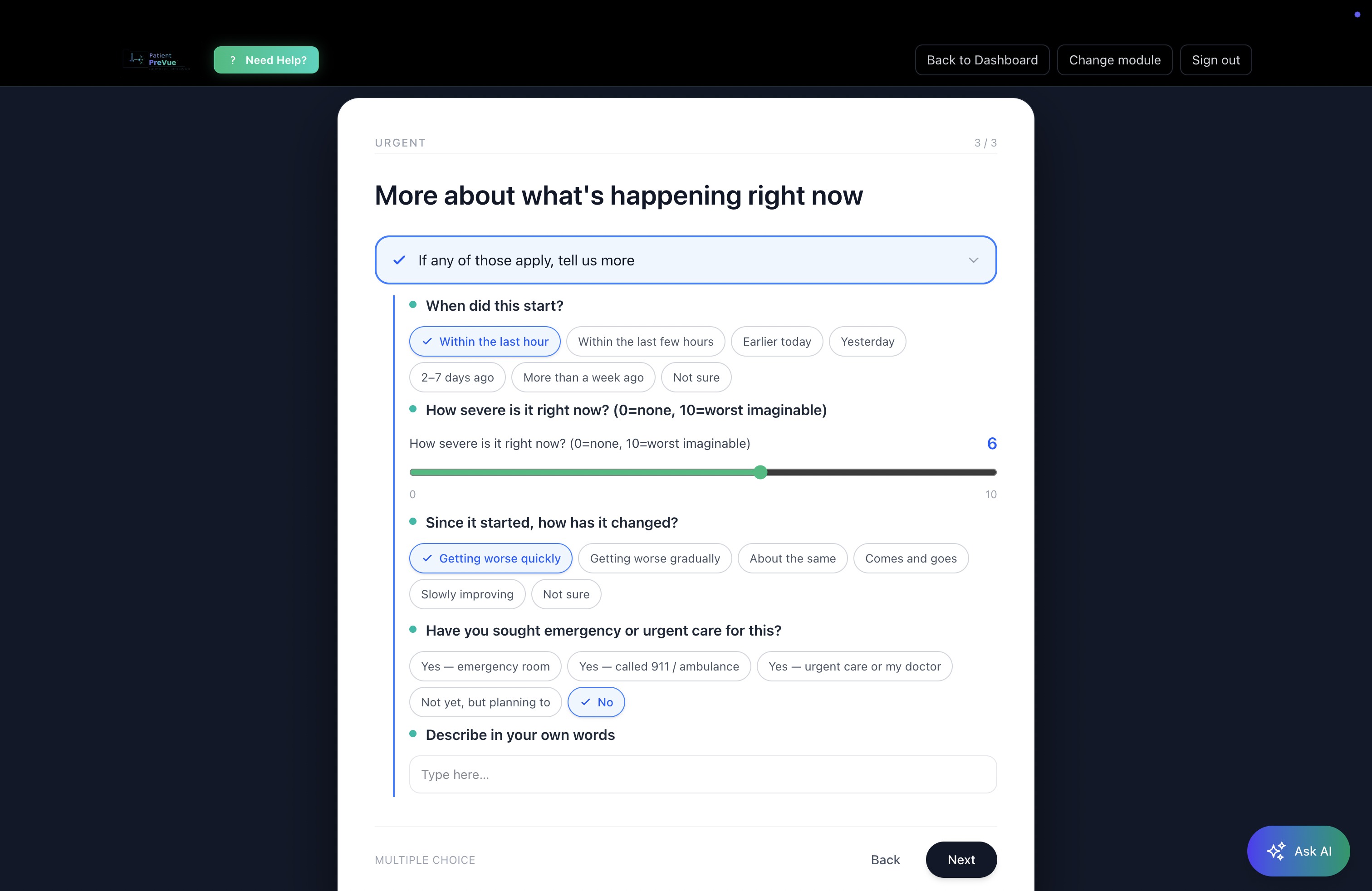
Adaptive patient intake assessments with branching logic solve this at the question level. If a patient reports neck pain, the next question is about radiation, not foot symptoms. If they indicate recent surgery, the form follows that thread. If they say pain is mild and stable, it doesn't ask them to rate their disability level at the same depth as someone reporting severe, worsening symptoms.
For chiropractic, orthopedic, and spine-focused practices especially, this matters. Intake for a lumbar complaint looks different from intake for a cervical complaint — both in what questions you ask and in what flags matter clinically.
The result is a shorter, more relevant patient experience and a more complete picture for you. Patients answer what's relevant. You get what you need.
What you don't gain: Branching logic can't compensate for poor question design. A well-branched form built around the wrong clinical framework is still a bad form. The quality of the underlying module matters as much as the logic.
3. Urgent-Flag Detection vs. Hoping Someone Reads Carefully
This one is underappreciated.
On a paper intake form, a patient writing "pain that woke me up at night, accompanied by unexplained weight loss" is answering a question. Whether anyone notices the significance of that combination before the visit depends entirely on whether someone reads the form carefully, in time, with enough context to act on it.
In a real chiropractic digital intake system, urgent-flag detection means certain responses — reported red-flag symptoms, severity thresholds, specific combinations of onset and character — are surfaced automatically. Not diagnosed. Not escalated by software. Highlighted for the provider to review.
The distinction matters and it's worth being precise: the system doesn't make clinical decisions. It surfaces the information so you can. That's the appropriate role of the tool.
For an allied health or chiropractic practice, the practical value is that you're not relying on a scan-read of a paper form to catch something that warrants a different kind of attention. The intake has already flagged it.
What you don't gain: Automated flagging doesn't replace clinical judgment. A flag is a prompt, not a triage. How you respond to it is still your call, and that's how it should be.
4. AI-Generated Summaries Ready Before Arrival vs. Staff Transcription
Let's talk about what happens with the intake data after it's collected.
In a paper workflow, someone — usually a front desk staff member or a provider — reads the intake, extracts the relevant information, and either enters it somewhere or summarizes it mentally before the visit. That takes time. It also introduces variability: different people extract different things, and summaries written under time pressure miss things.
Digital patient intake with AI-generated summaries changes this step. Once a patient completes their intake, a structured summary is generated automatically — formatted for clinical review, not for patients. Urgent items at the top. Notable findings next. Supporting context below. A provider can read it in under two minutes and walk into the room with a baseline understanding of why the patient is there, what they've already reported, and what the intake flagged as significant.
The other half of this is the patient-facing narrative summary — a first-person account of what the patient reported, in plain language, that the patient can sign, download as a PDF, and bring to any provider in any system. That matters for practices that see patients who are also seeing other providers: the patient arrives with their own organized account, not relying on you to extract their history.
Both summaries are generated from the same intake responses. Neither requires staff time to produce.
What you don't gain: AI-generated summaries reflect what the patient reported. They're only as accurate as the intake responses, and they don't add clinical information the patient didn't provide. They're a starting point, not a workup.
5. Signed PDF Export vs. Paper Scanning
This one seems small. It isn't.
Paper intake forms have to go somewhere. In most practices, they get scanned — which takes time, creates a file that's searchable only by filename, and produces an image that can't be queried or organized by content. The patient's intake lives in a folder, not in a system.
Electronic signature and PDF export in a paperless patient intake workflow means the intake is already a document the moment it's completed. The patient signs it electronically. It's immediately available as a polished, organized PDF. It can be stored, shared with other providers at the patient's direction, and retrieved without hunting through scanned files.
For practices coordinating care with other providers — referring to spine surgeons, receiving patients from GPs, co-managing with PT — this matters. The record is portable from the start.
What you don't gain: A signed digital intake isn't inherently more legally defensible than a signed paper form. Digital documentation has its own requirements. Don't conflate "electronic signature" with any specific legal standard — consult appropriate guidance for your jurisdiction and practice type.
What to Actually Look for in Digital Intake Software
Most of what's marketed as "digital intake" is a form builder with a submission button. That handles one of the five things above (structured data, partially) and misses the rest. Here's a more useful checklist for evaluating patient intake automation tools:
Specialty-specific modules, not generic forms.
A chiropractic intake module should look different from a physical therapy intake module, which should look different from an acupuncture intake module. If a system offers one intake template for everyone, it's a form builder, not an intake system. Look for 20+ specialty modules as a baseline — and look for the ability to customize those modules for your specific practice.
Branching logic at the question level.
Not just page-level branching ("if the patient says yes, show the next section"). Real branching means individual questions route based on prior answers, so each patient gets a relevant, proportionate experience.
Urgent-flag detection built into the branching.
This should be transparent — you should be able to see what the system flags and why. If a vendor can't explain the logic, be skeptical.
AI summaries formatted for providers, not for patients.
The summary a provider reads before a visit should be clinically organized — urgent items first, not chronological or alphabetical. The summary a patient receives should be in plain language. These are different documents with different purposes, and a system that generates only one or the other is leaving something on the table.
Signed export and records portability from day one.
Patients who can take their intake record with them — to a specialist, to a hospital, to another provider — are better-prepared patients. That's good for the care relationship and reduces the "what medications are you on?" re-discovery loop in every visit.
No-code customization for your practice.
Your intake should reflect your clinical approach. The ability to edit assessment questions, add practice-specific items, and save custom modules is the difference between a tool that fits your workflow and one you work around.
How PatientPreVue Approaches Digital Intake
PatientPreVue's adaptive intake assessments are built on 20+ specialty modules covering chiropractic, orthopedics, spine care, general practice, and more. Each module uses branching logic at the question level, with urgent-flag detection surfacing significant responses for provider review — not triaging them, flagging them.
When a patient completes intake, two summaries are generated automatically: a tiered clinician overview (urgent → notable → informational) and a first-person patient narrative. Both are available before the patient arrives. The patient signs electronically and can export a PDF to share with any provider, on or off the platform.
The module editor lets providers customize any assessment — edit questions, add branching options, save as a custom module their patients receive. The intake adapts to your practice, not the other way around.
Patients who don't yet have a provider on the platform still get full value from the patient-facing tools: their intake is organized, summarized, signed, and exportable. They walk into any visit with a structured record of what they reported — whether the receiving provider is on PatientPreVue or not.
That's the "walk into any visit already understood" promise. Not a feature pitch — an accurate description of what the intake produces.
The Bottom Line
The gap between a PDF form and a real digital intake system is wider than most practices realize until they're looking at both side by side. Structured data, branching logic, urgent-flag detection, AI-generated summaries, and signed PDF export aren't incremental upgrades — they're different categories of tool.
None of this replaces clinical judgment. Intake is context, not diagnosis. But arriving at a visit with organized, flagged, summarized context is a different starting point than arriving with a handwritten form and a hope.
If you're evaluating digital intake vs. paper intake for your chiropractic or allied health practice, the five differences above are the right questions to ask of any system — including this one.
See PatientPreVue's intake modules and specialty assessments →